
How to Change Your IP Address: A Comprehensive Guide
How to Change Your IP Address: A Comprehensive Guide


5 Minutes
You can change your IP now using few ways like VPNs and Proxies. We'll cover on how to use them and change your IP now in this article.
Your IP address is a unique identifier that allows you to connect to the internet, and you might be thinking “How can I change my IP address” for good reasons too. By using various methods to switch or hide your public IP address, you can enhance your online privacy and protect yourself from cyber threats and avoid censorship or bans. In this comprehensive guide, we'll walk you through different ways to change your IP address on any device, including computers, mobiles, and tablets.
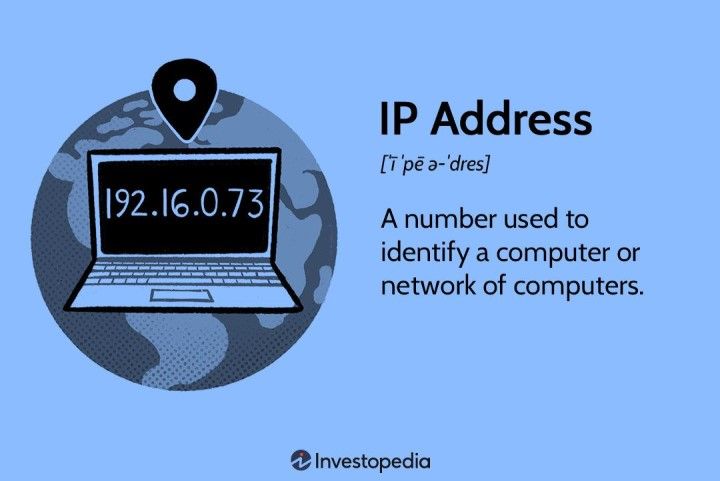
Understanding Your IP Address
Before we know how change your IP address, it's essential to understand what an IP address is and how it functions. An IP address, short for Internet Protocol address, is a numerical label assigned to each device connected to a computer network. It serves two primary purposes: identifying the device's location on the network and facilitating data transfer between devices.
Your IP address is assigned by your Internet Service Provider (ISP) and consists of a series of numbers separated by periods. It can be either IPv4 or IPv6, with IPv4 being the most common format used today. Your IP address is public, meaning it can be easily tracked by websites and other online entities.
Reasons to Change Your IP Address
Changing your IP address offers a lot of benefits, including better privacy and security, bypassing content restrictions, and avoiding website bans. Let's take a closer look at these reasons:
Privacy and Security: Changing your IP address helps protect your online privacy by making it harder for cybercriminals to track your online activities. It adds an extra layer of security, especially when connecting to unsecured networks like public Wi-Fi. Additionally, changing your IP address can safeguard your information in the event of a data breach.
Bypassing Content Restrictions: Many websites and streaming platforms have region-based content restrictions. By changing your IP address and subsequently your IP location, you can bypass these restrictions and access region-specific content. Avoiding Website Bans: Some websites ban, or block users based on their IP addresses. If you've been banned from a site or find yourself on a blacklist, changing your IP address can help you bypass these restrictions and regain access to the blocked content.
By changing your IP address, you can improve your online experience and enjoy greater privacy and freedom while browsing the internet.
How to Change Your IP Address
Now that we understand the importance and benefits of changing your IP address, let's explore different methods you can use to change your IP address. There are several ways to change or hide your IP address, including using VPNs (Virtual Private Networks), proxies, and manually adjusting your device settings. We'll discuss each method in detail below.
1. Using a VPN
Using a VPN is one of the most secure ways to change your IP address. A VPN creates a secure and encrypted connection between your device and the internet, routing your internet traffic through a remote server. This process replaces your original IP address with the IP address of the VPN server, effectively masking your identity and location.
To change your IP address using a VPN, follow these steps:
Choose a Reliable VPN Service: Select a reputable VPN service provider that offers a wide range of servers and strong encryption protocols.
Install and Set Up the VPN: Download and install the VPN software or app on your device. Follow the instructions provided by the VPN service to set up your account and configure the VPN settings.
Connect to a VPN Server: Once the VPN is installed and set up, open the VPN app or software and select a server location. Choose a server in a location where you want your new IP address to appear.
Verify Your New IP Address: After connecting to the VPN server, you can verify your new IP address by visiting an IP lookup website or using online tools such as "What Is My IP Address" These tools will display your new IP address and location.
Using a VPN offers strong encryption and privacy protection, making it an excellent choice for changing your IP address securely.
How ever, there is a drawback that makes VPN not suitable for certain use cases, for example if you want a residential IP to hide the fact that you are using a VPN from websites you visit, that’s where you have to a spend a lot more to achieve this, and there are limited providers that offer these kinds of services.
2. Using a Proxy
Another method to change your IP address is by using a proxy server. A proxy acts as an intermediary between your device and the internet, allowing you to browse the web using its IP address instead of your own. While proxies don't offer the same level of security and encryption as VPNs, they offer their own benefits like cheaper prices, access to residential IP and rotating IPs which VPNs lack.
To change your IP address using a proxy, follow these steps:
Find a Reliable Proxy Server: Search for a reliable proxy server online. There are both free and paid proxy services available. Choose a proxy server, such as Resi.gg that suits your needs and provides a secure connection.
Configure Your Device's Proxy Settings: Once you have selected a proxy server, configure your device's proxy settings to connect to the server. The process may vary depending on your operating system and browser. You can find a detailed instruction in our guide.
Verify Your New IP Address: Once you have configured the proxy settings, you can verify your new IP address by visiting an IP lookup website or using online tools. These tools will display the IP address associated with the proxy server you are using.
Using a proxy can provide a simple way to change your IP address, but keep in mind that it may not offer the same level of security and privacy as a VPN.
Changing IP Address on Mobile Devices
Changing your IP address on mobile devices follows a similar process as on computers. You can use VPN apps or adjust the network settings to change your IP address on smartphones and tablets.
Using a VPN on Mobile Devices
To change your IP address on mobile devices using a VPN, follow these steps:
- Download a VPN App: Search for a reliable VPN app in your device's app store. Choose a VPN app with positive reviews and a user-friendly interface.
- Install and Set Up the VPN App: Install the VPN app on your device and follow the on-screen instructions to set up your account and configure the VPN settings. Make sure to choose a VPN server location to change your IP address.
- Connect to the VPN Server: Open the VPN app, sign-in to your account, and select a server location. Tap on the "Connect" button to establish a secure connection to the VPN server.
- Verify Your New IP Address: After connecting to the VPN server, you can verify your new IP address by visiting an IP lookup website or using online tools. These tools will display your new IP address and location.
Using a VPN app on your mobile device provides the same level of security and privacy as using a VPN on a computer.
Using Proxies on Mobile Devices
To change your IP address on mobile devices using proxies, you can either use apps or edit the settings manually. we have covered the apps on our article in details so check it out if you want to use apps to use proxies on mobile.
If you want to change the settings manually however, you need to follow these steps:
Android Devices
To use a proxy manually on android devices, follow these steps:
- Go to Settings
- find the “Networks” or “Connections” section
- Tap on “Wi-Fi”
- Tap on “Settings”
- Tap on “Advanced”
- Tap on “Proxy” and set it to “Manual”
Now just enter proxy settings you got from the provided.
iPhone
- Go to Settings
- Tap on "Wi-Fi"
- Tap on your active Wi-fi connection
- Scroll all the way down to "Configure Proxy"
- Tap on "Manual"
And enter the provided settings from the provider.
Conclusion
Changing your IP address is a valuable tool for enhancing your online privacy and security, bypassing content restrictions, and avoiding website bans. By using methods such as VPNs, proxies, or manually adjusting your device settings, you can easily change your IP address on various devices, including computers and mobile devices.
Remember to choose a reliable VPN or proxy service that offers strong encryption and privacy features. Regularly verify your new IP address using online tools to ensure the changes have been successfully implemented.
Tags:


Popular Articles
Unleash Online Freedom with Us
Discover our premium proxy plans that will revolutionize your web experience. With cutting-edge technology, unbeatable reliability, and limitless possibilities, our proxies are your gateway to unrestricted access, enhanced security, and lightning-fast browsing. Join our satisfied community and subscribe today to unlock the true power of proxy services.